1. Getting Started
Install SwiftBiu, keep it in the menu bar, then grant Accessibility permission when you want direct selection triggers, cut/paste helpers, OCR region selection, and file drag workflows.

Draw SwiftBiu icon
Compressing 2 files
south Drag down to download
SwiftBiu — context actions for text, files, OCR & plugins.
SwiftBiu — 上下文动作平台,覆盖文本、文件、OCR 与插件。
Frame text on screen with a shortcut
Real SwiftBiu text, AI, image, and file workflows on macOS.
Menu Bar Popover
Click the menu bar icon to access quick actions:
- dock_to_right Pinned Plugins: Quickly enable/disable or configure plugins.
- settings Preferences (⌘,): Open SwiftBiu configuration settings.
- power_settings_new Quit SwiftBiu (⌘Q): Fully exit the application.
text_fields Core workflow
2. Text actions
Select text in Mail, Safari, Notes, editors, chat apps, or any selectable field. SwiftBiu can show a native toolbar beside the selection or run a dedicated action from a shortcut or gesture.
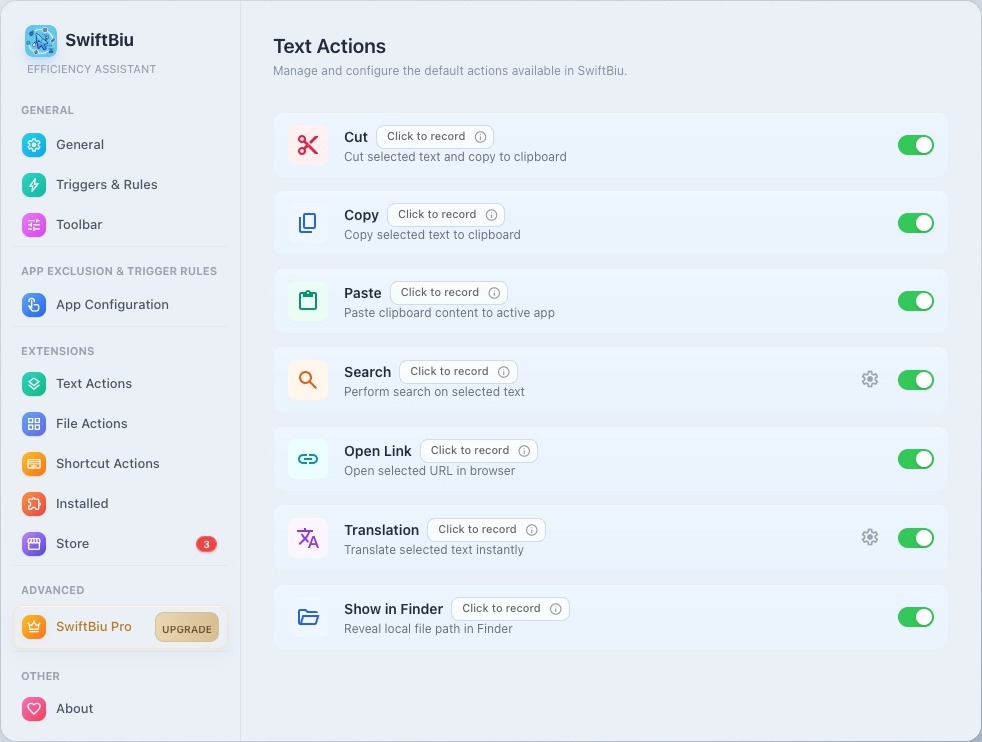
Translate, search, copy, cut, paste
Use built-in actions for translation, search engines, link opening, clipboard helpers, and text formatting without switching apps.
AI text and image actions
Run AI rewrite, prompt-driven processing, Gemini-style actions, or text-to-image tools from the same toolbar.
Plugin-powered text workflows
Send selected text into JavaScript plugins or richer HTML web extensions, then paste output back or show an interactive result.
Dedicated shortcuts
Bind favorite built-in actions, plugins, or web extensions to shortcuts so they run without first opening the full toolbar.
folder_open Core workflow
3. File actions
SwiftBiu now handles files and links, not only selected text. Drag files into configured routes or run file actions from the toolbar when file content is available.
Image and video compression
Compress one file or a batch and watch progress, output size, saved ratio, and generated files.
Convert images and remove backgrounds
Use built-in file actions for image format conversion and image background removal when those actions fit the selected file type.
Share and reveal files
Send files through AirDrop, system share, Reveal in Finder, Open With, or other system integration actions.
4/8-direction drag routes
Map file drag directions to different actions. You can combine drag timing with shortcuts and customize routes per app.
document_scanner Core workflow
4. OCR capture
When text cannot be selected, trigger OCR, draw a screen region, extract text, then copy, translate, or continue processing with toolbar actions.
Region selection
Press the OCR shortcut, draw a rectangle, and let SwiftBiu recognize the text inside that screen area.
Copy or translate automatically
Choose whether recognized text should be copied, translated, or shown for another action.
Route OCR text to plugins
Treat OCR text like selected text: send it into text actions, AI workflows, or your own SwiftBiuX plugins.
route Core workflow
5. Trigger system
SwiftBiu routes the same gesture differently depending on context and app. Configure global defaults, then override them for specific apps.
6. Core settings
Open Settings > Triggers & Rules to configure global copy triggers, gesture and shortcut triggers, drag-and-drop quick triggers, and OCR shortcuts. General settings now live on their own page.
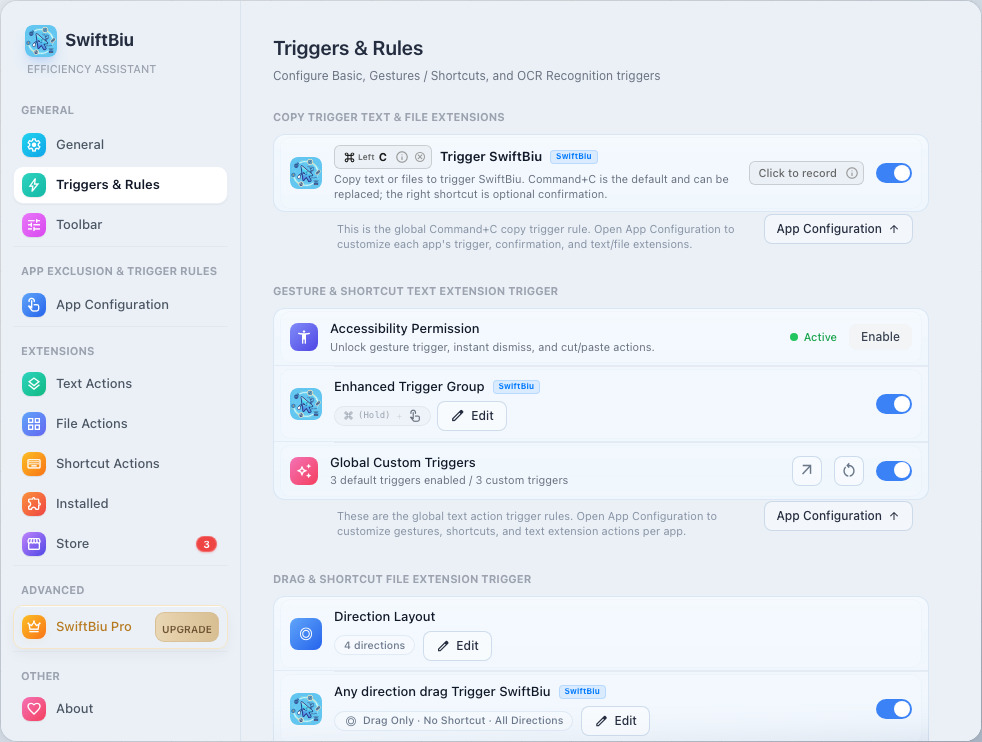
Copy triggers
- Choose whether copying shows SwiftBiu or runs a specific action directly.
- Configure system copy, enhanced copy, confirmation shortcuts, and the default trigger action.
Gesture shortcuts
- Configure double-tap, left swipe, right swipe, Shortcut + Gesture, and Gesture + Shortcut globally.
- Bind quick triggers to the SwiftBiu toolbar, built-in actions, JavaScript plugins, or web extensions.
Drag-and-drop quick triggers
- Configure global file drag directions, 4/8-way radial triggers, drag timing, and default file actions.
7. Toolbar and appearance
Learn how to use the smart toolbar, built-in actions, and customize its appearance and layout.
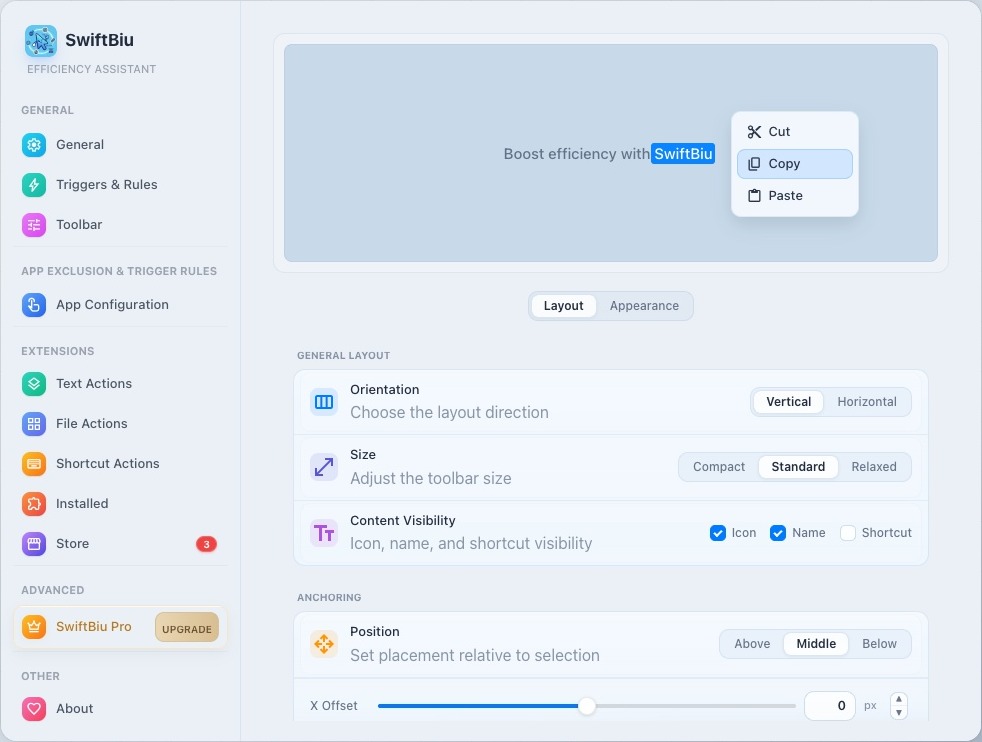
Basic Usage
- touch_app Select Text: Highlight text in any application (Browser, Word, etc.).
- visibility Toolbar Appears: The toolbar automatically pops up near your cursor.
- ads_click Click & Action: Click an icon to execute the corresponding action.
Built-in Actions
SwiftBiu comes with several core productivity tools:
- Copy, Cut & Paste: Core clipboard management.
- Search: Perform searches using your preferred engine.
- Open Link: Quickly open selected URLs in your browser.
- Translate: Instant translation of selected text.
Each action can be toggled individually in the Built-in Extensions settings.
Layout Customization
- Orientation: Choose between Horizontal or Vertical stack.
- Size: Adjust the overall scale of the toolbar.
- Anchoring & Offsets: Fine-tune the precise popup position.
Appearance Styles
- Show Icons & Names: Customize the density of information.
- Corner Style & Opacity: Match your desktop aesthetics.
- Accent Color & Background: Make the toolbar yours.
8. App configurations
Use Settings > App Configurations to override global rules per app. Active trigger areas, the SwiftBiu toolbar, copy triggers, gesture shortcuts, and drag-and-drop quick triggers can all be customized for each app.
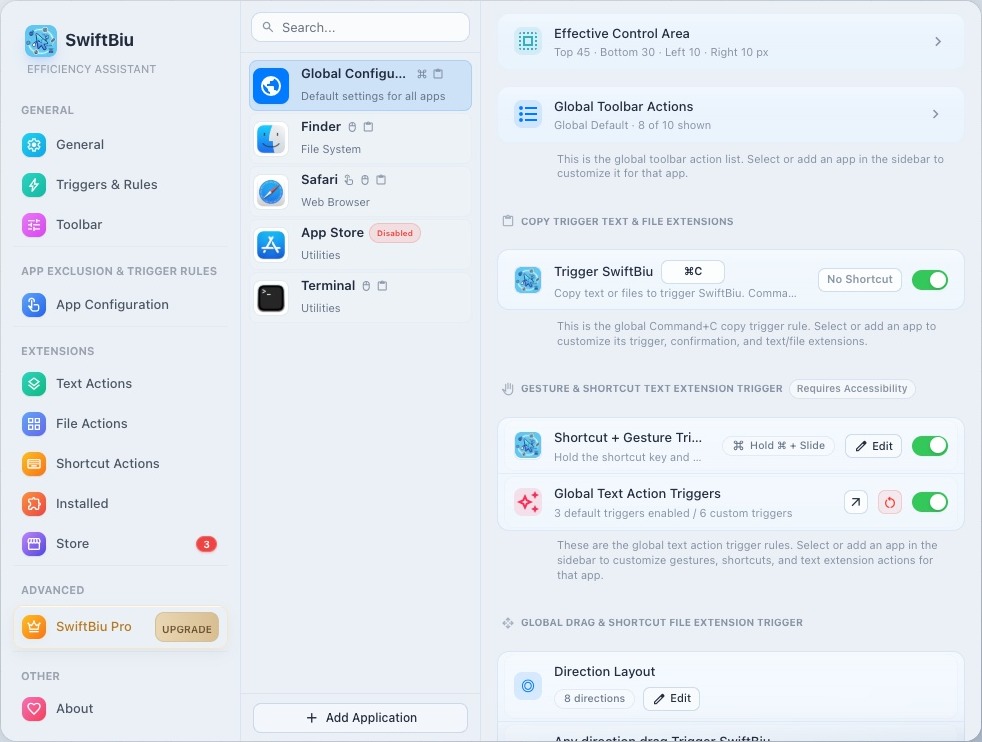
Active trigger areas
Define where SwiftBiu is allowed to respond inside each app, avoiding sidebars, canvas edges, games, or other areas prone to accidental triggers.
SwiftBiu toolbar
Customize whether the toolbar appears, how it appears, which actions are available, and the action order for each app.
Copy triggers and gesture shortcuts
Override copy triggers, double-tap or swipe gestures, shortcut combinations, and quick triggers per app for editors, browsers, chat tools, or pro software.
Drag-and-drop quick triggers
Customize file drag directions, 4/8-way radial routes, and default file actions per app so images, videos, and documents can follow different workflows.
9. Plugins and extensions
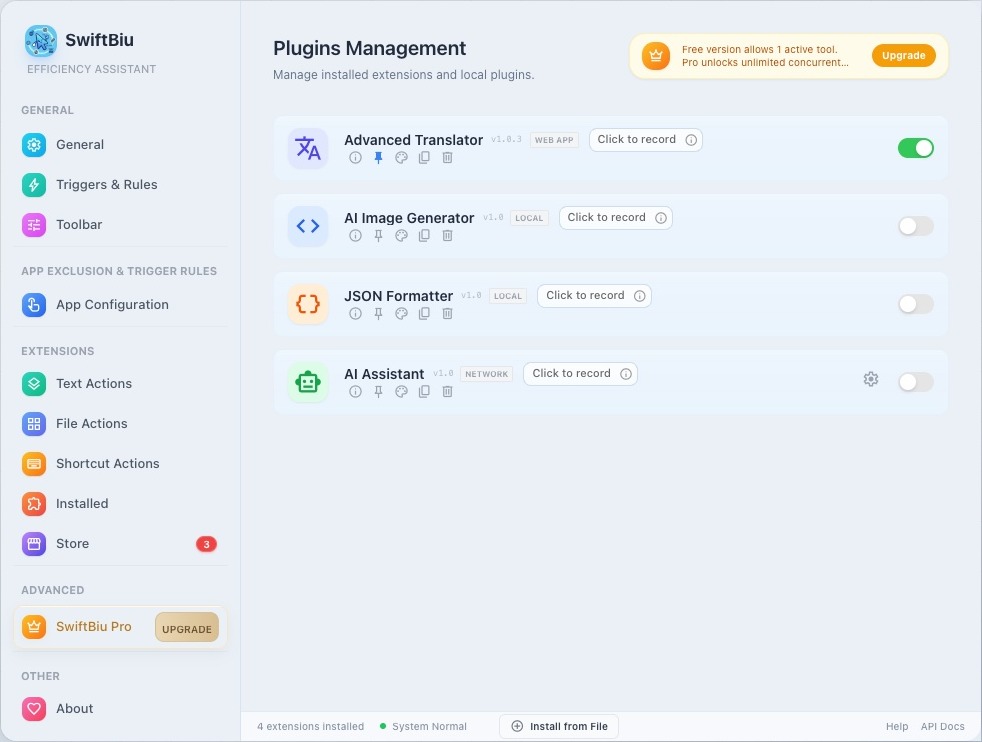
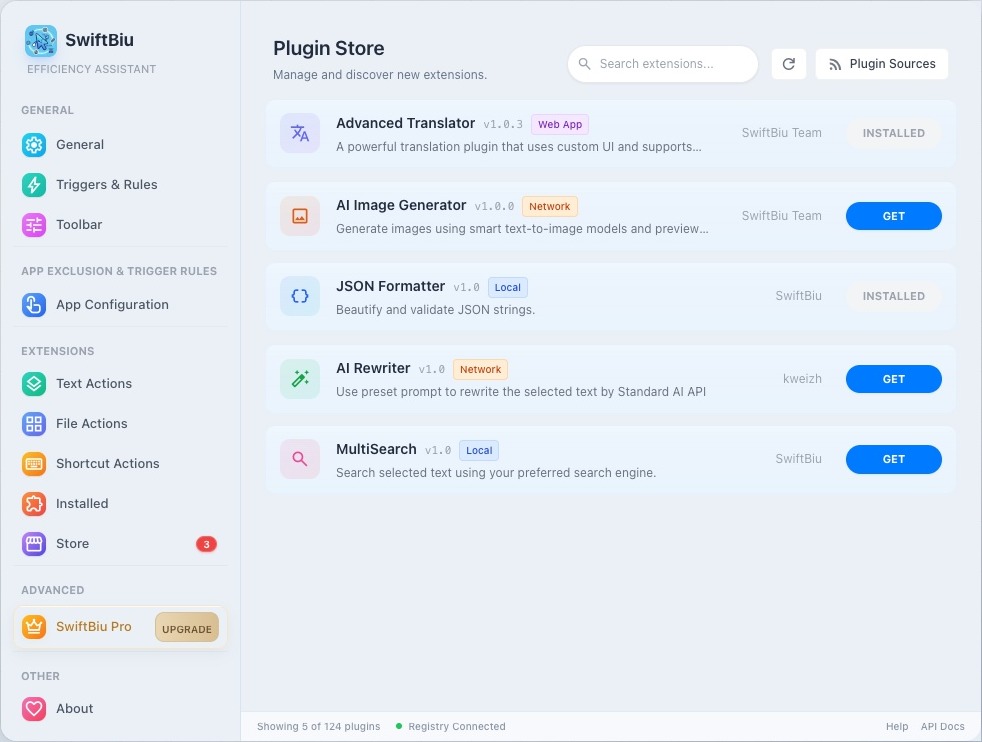
Manage built-in text/file actions, installed SwiftBiuX plugins, HTML web extensions, the extension store, and custom plugin sources.
10. Free vs Pro Feature Comparison
We are committed to providing a high-quality free plan, while offering a lifetime Pro license for advanced users who need robust multitasking. Below is the detailed feature comparison:
| Feature | Free Tier | Pro Tier |
|---|---|---|
| Text Actions | Fully Free | Includes all free features |
| File Actions | 1 active action (manual switching required) | Enable multiple at once (no switching required) |
| Shortcut Actions | 1 active action (manual switching required) | Enable multiple at once (no switching required) |
| Extension Actions | 1 active action (manual switching required) | Enable multiple at once (no switching required) |
| Simultaneous Multitasking | 1 shared premium slot | Multiple actions active at once, staying ready together |
| Custom Trigger Rules | Supported (shortcuts, app configurations, extension triggers) | Supported (shortcuts, app configurations, extension triggers) |
| Technical Support | Community Support | Priority Technical Support |
| Future Updates | — | All future Pro features |
| Price & License | Free to Use | $9.99 Lifetime License (Pay once, own forever) |
11. Troubleshooting
Check Accessibility permission, app configurations, shortcut conflicts, OCR settings, file drag routes, folder authorization, or plugin loading issues.